28.6139° N · 77.2090° E · SIGNAL LIVE

Know where your field team is. Every shift. Every stop.

GeoWave turns the phones your employees already carry into a complete field workforce system. No biometric machines, no hardware.

≤ 3 secClock-in time
3 minLocation updates
Android + iPhoneOne app for both
SCROLL
Key features

Everything you need in one platform

Practical features to simplify field team management, improve accountability, and give you complete visibility — from the field to the office.

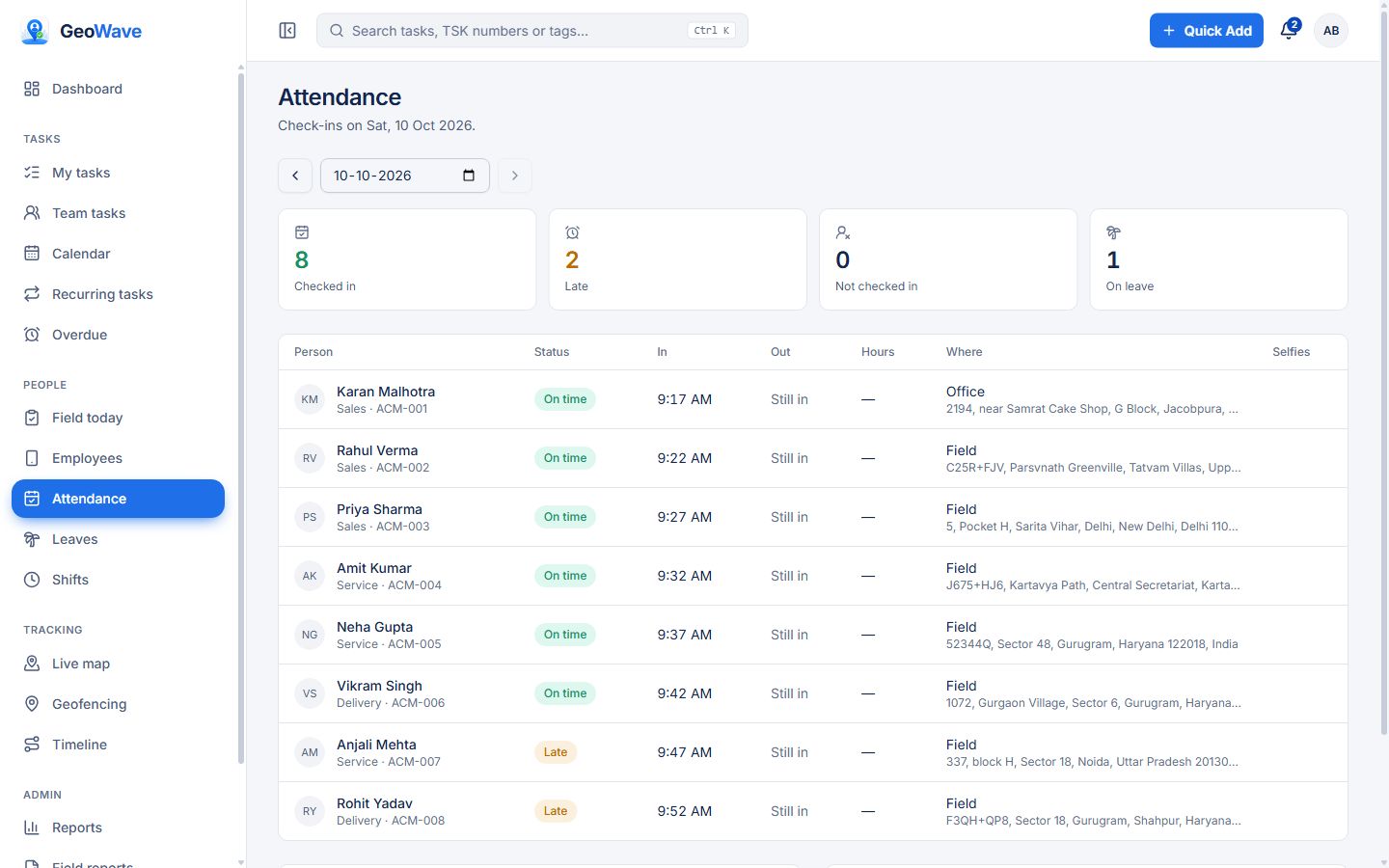
Selfie Check-in

GPS location, time and battery level with every check-in — at the office, a client site or in the field.

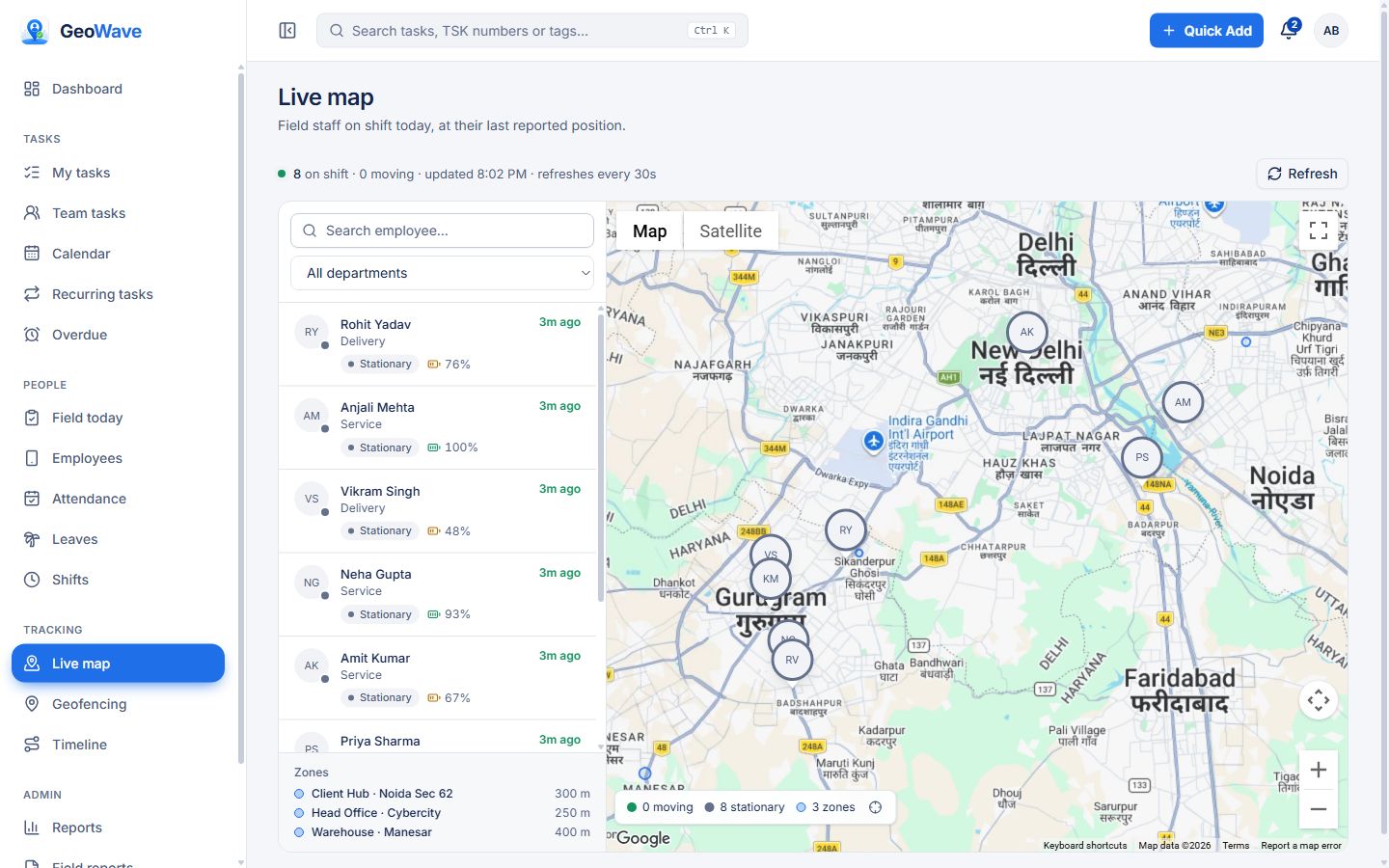
Live Team Map

See everyone on shift on one interactive map, with live location, battery level and today's route.

Task Assignment

Assign work to your field team, track it to done, and see it next to attendance, visits and location.

All-day Tracking

Background location every 3 minutes from check-in to check-out, and off the rest of the time. Saved on the phone when the network drops.

Geofencing

Place zones around offices and sites on the map. See who is inside, or allow check-ins only within a zone.

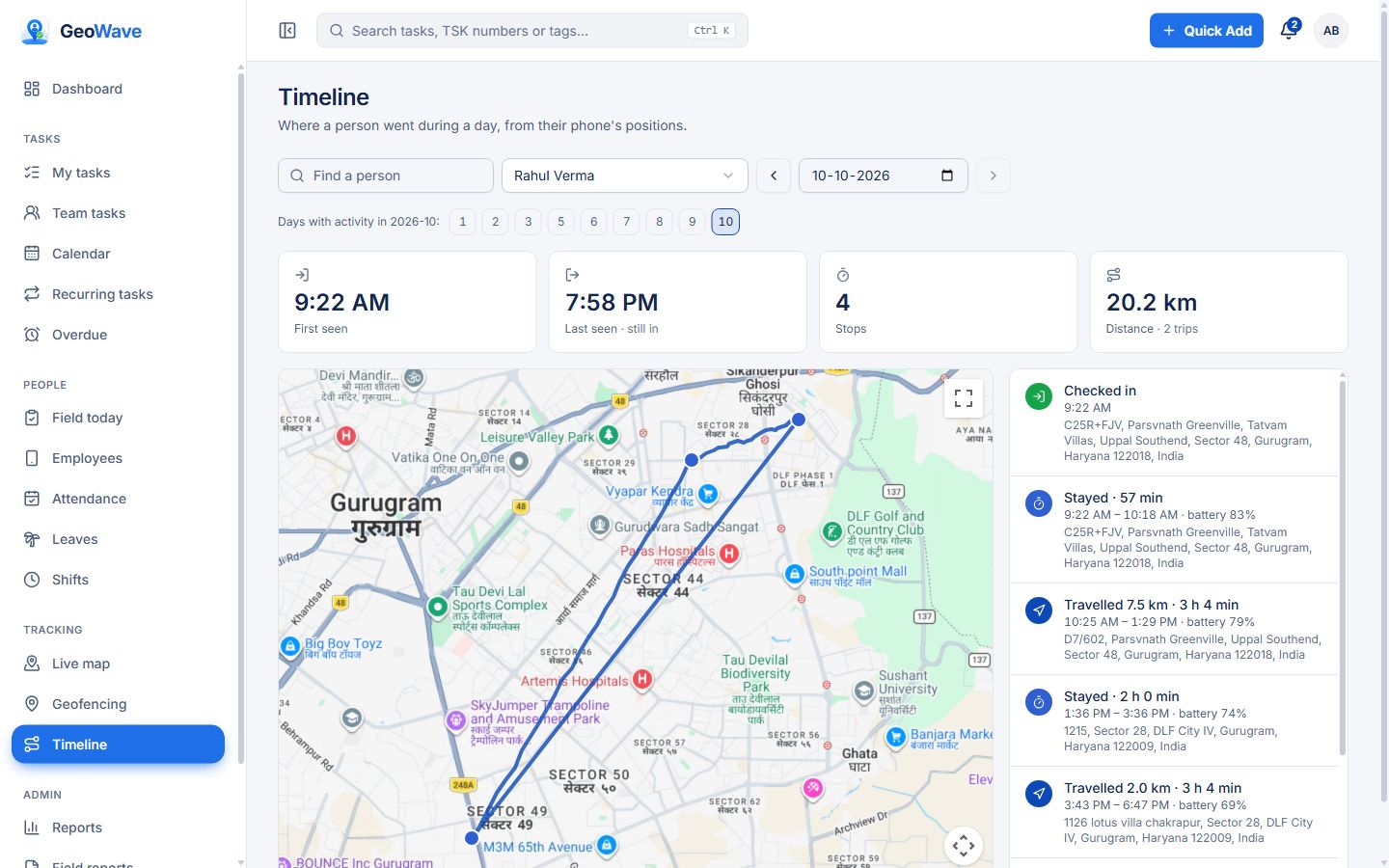
Day Timeline

Each employee's full day as stays, visits and travel, with distance covered and first and last seen.

Shifts & Breaks

Set shift timings and grace minutes, flag late arrivals automatically, and allow several check-ins a day for breaks and site visits.

Leave Approvals

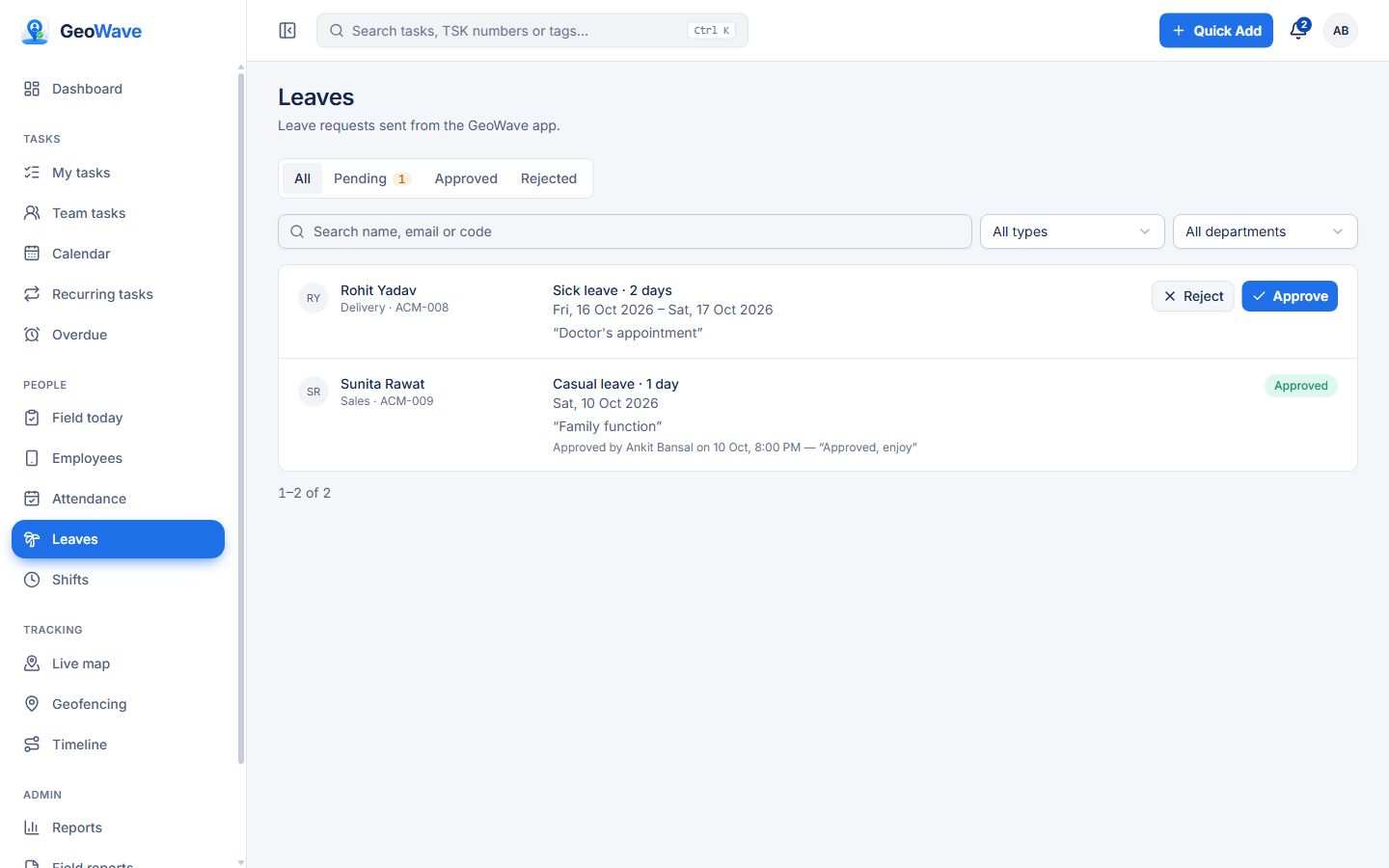
Employees apply from the app against casual, sick and earned quotas. Managers approve or reject in one tap.

Instant Notifications

Check-ins, late arrivals, check-outs and leave requests reach the right manager by push. You choose who hears about what.

Clean Reports

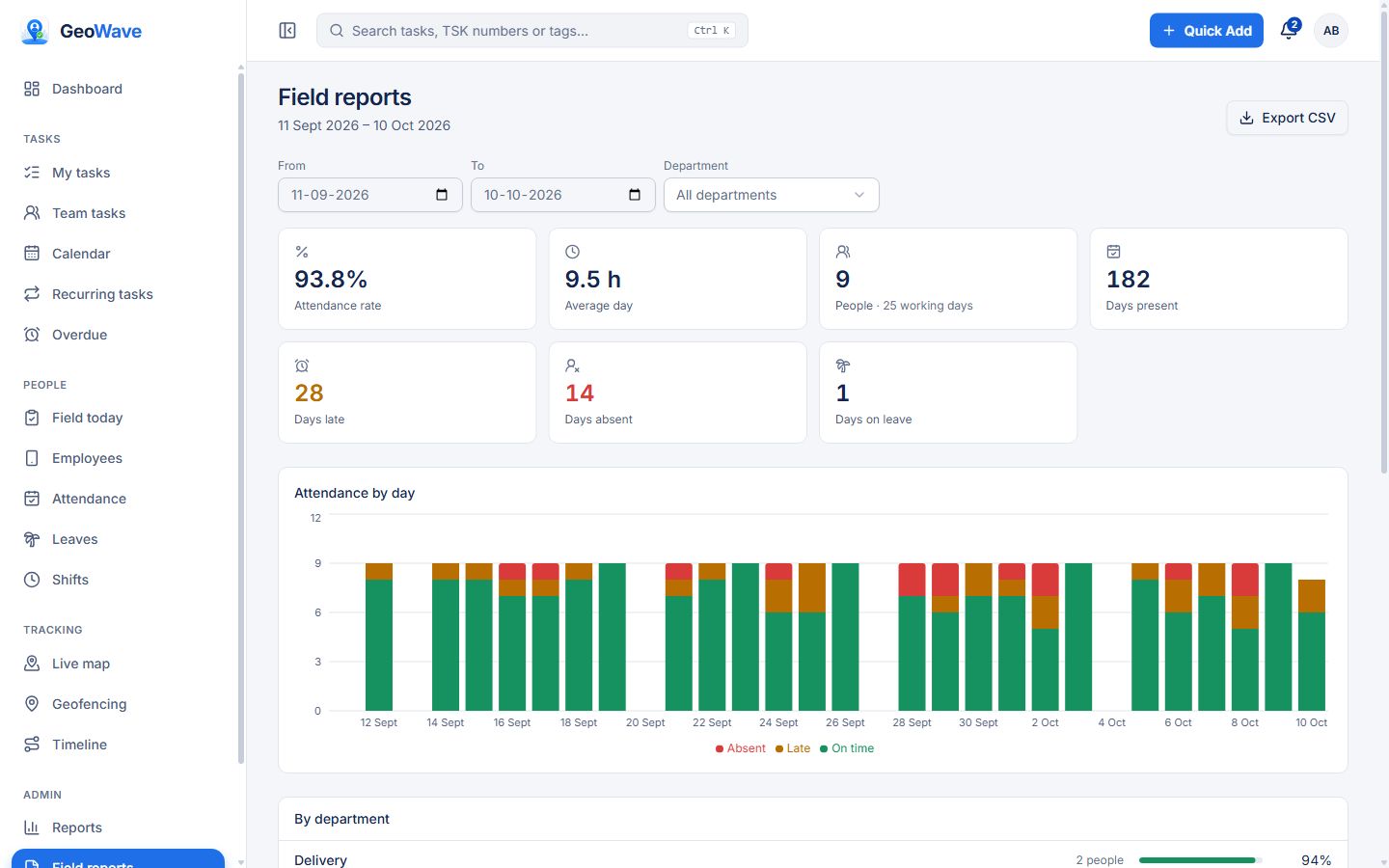
On-time, late and absent by day, department and person, with a 30-day trend. Export to CSV for HR and payroll.

Phone Health

See which phones stopped reporting, have notifications off or a low battery — and wake a silent phone remotely.

Face Check

Optional: each check-in selfie is matched to the employee's enrolled face, with their consent. Only the right person marks attendance.

Who it's for
Sales & distributionReps visiting retailers and dealers — see every visit, the route and the time spent.
Field service & installationTechnicians on customer sites — attendance at the site, and the job as a task.
Delivery & logisticsRiders and drivers — live position, distance travelled and a clean daily record.
Pharma & FMCGMedical and merchandising reps — doctor and outlet visits with GPS proof.
Security & facility staffGuards and housekeeping across sites — geofenced check-in and shift timing.
Construction & site teamsSupervisors and crews — who reached which site, and when.
How it works

Three steps. Zero hardware.

STEP 01

Employee checks in

They open GeoWave, pick where they are — office, client site, field or remote — and take a selfie. GPS location and time are stamped automatically.

STEP 02

GeoWave tracks the shift

Location updates flow in every 3 minutes in the background until check-out. Patchy network? Points are kept on the phone and synced the moment the signal returns.

STEP 03

You see everything, instantly

Check-ins, late arrivals and leave requests hit your phone as they happen — and the full picture lives on one live dashboard.

The real product

See GeoWave on the web.

These are actual screens from the GeoWave web app — the dashboard admins and managers use every day. Click a screen to see it full size.
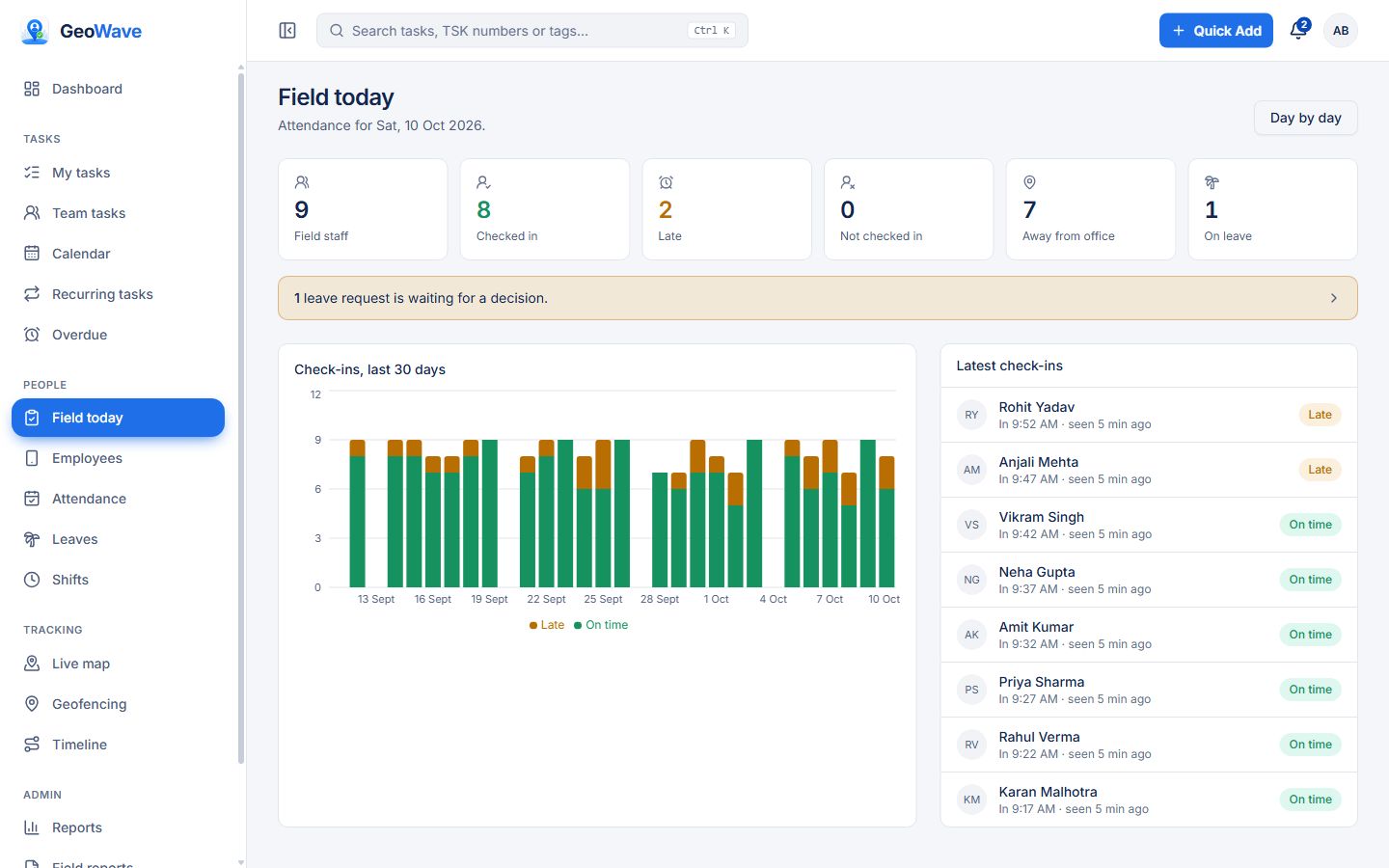
app.geowave.co.in/field
GeoWave web dashboard: Today at a glance

Today at a glance

Who has checked in, who is late, who is away from the office and who is on leave — with a 30-day trend and the latest check-ins.
  • Checked in, late, not in and on-leave counts
  • Pending leave requests flagged at the top
  • 30-day on-time vs late chart

Screens show a demo organization with sample people and data.

Leave approvals

Leave requests, approved
in one tap.

No more leave over WhatsApp messages and spreadsheets. Requests, approvals and balances live in GeoWave — and the attendance register knows who is on leave.
01
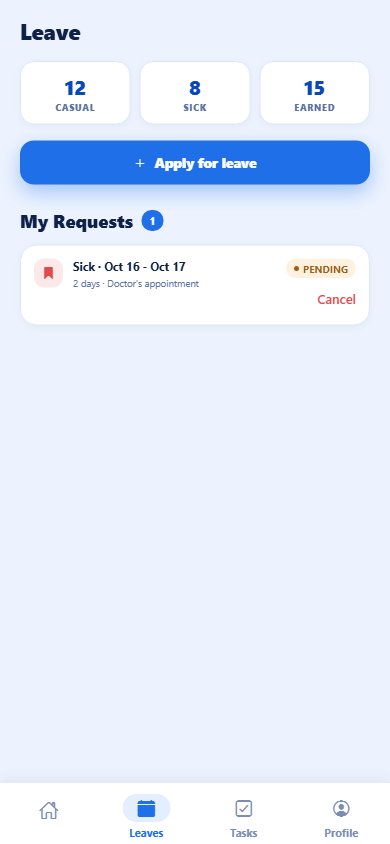
Employee applies from the appCasual, sick or earned leave, for a day or a range, with a reason. The app shows what is left of each yearly quota.
02
The manager is notifiedThe reporting manager and admins get a push straight away, and the request waits at the top of the dashboard.
03
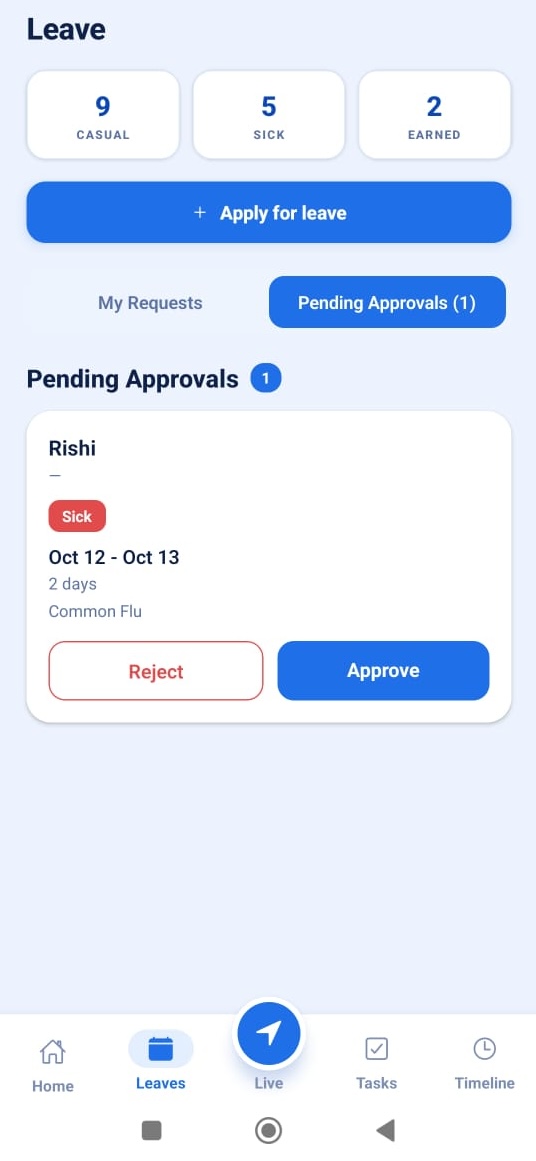
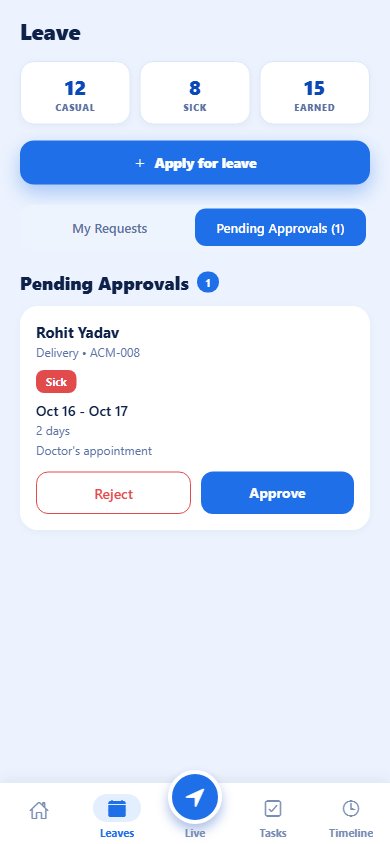
Approve or reject in one tapFrom the phone's Pending Approvals tab or the web Leaves page, with an optional comment. Managers only see their own team.
04
Everything stays in stepThe employee is told the decision, the balance updates, and the day shows as on leave in attendance and reports.
Employee's leave screen with balances and a pending request
Employee: balances and requests
Manager's pending approvals with Approve and Reject buttons
Manager: approve or reject
app.geowave.co.in/field/leaves
GeoWave web dashboard: leave requests with Approve and Reject
The GeoWave app

Everything your team needs,
on the phone they carry.

Android and iPhone. Employees sign in with their mobile number, check in with a selfie, apply for leave and work their tasks. Managers get team approvals and the live map too.

Get it on Google Play
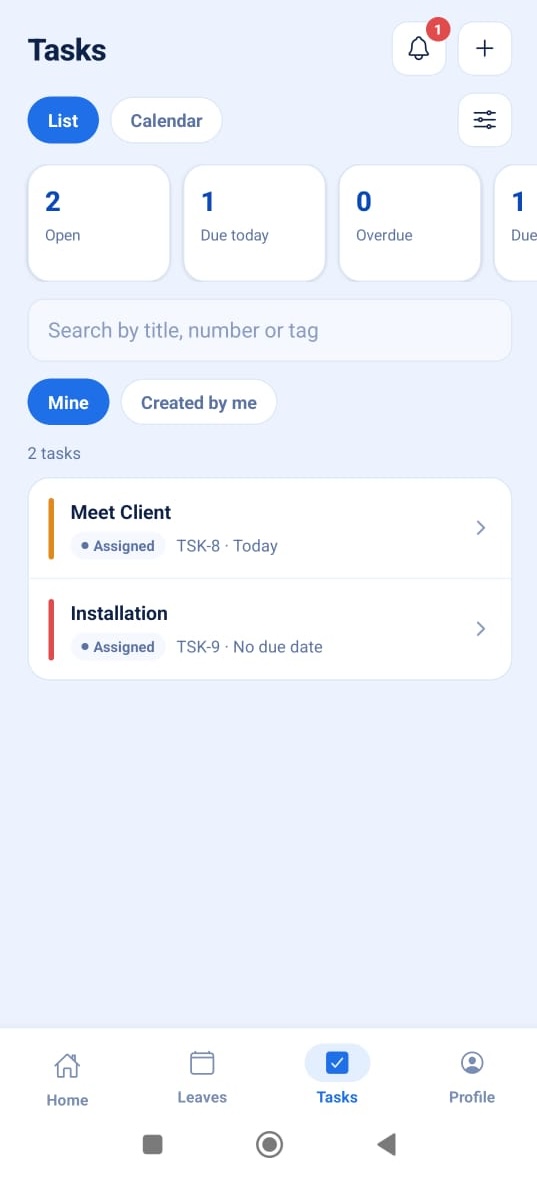
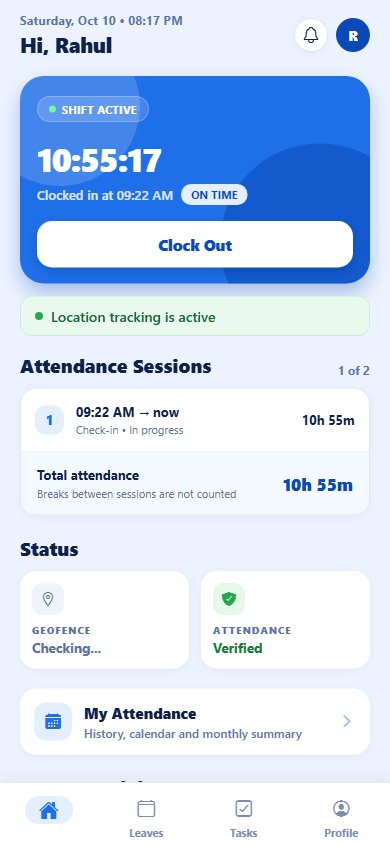
GeoWave phone app: Check in and shift
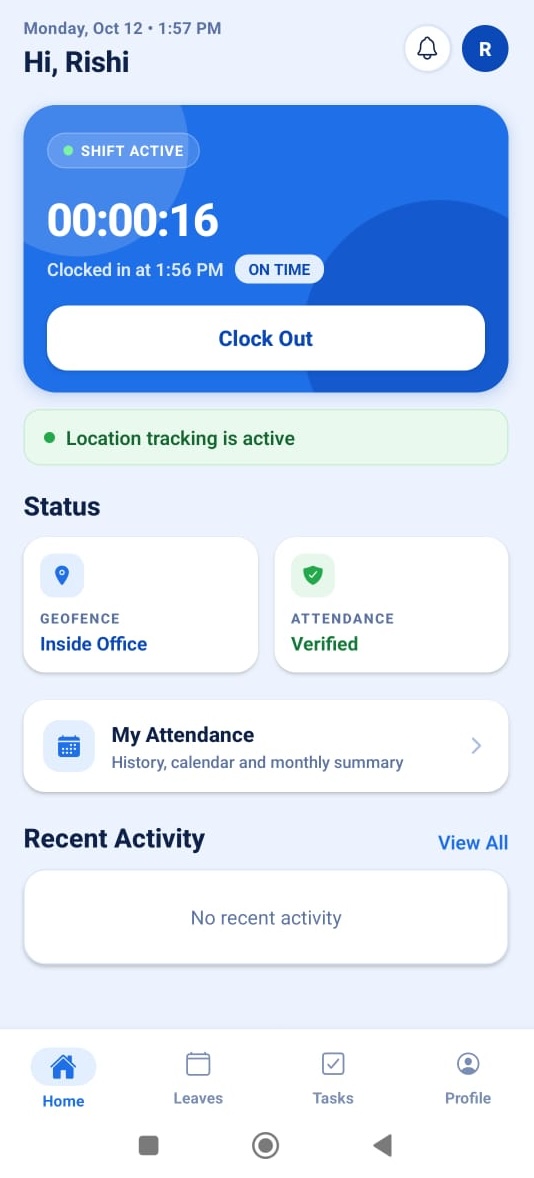
Check in & shiftSelfie check-in, shift timer, sessions and tracking status
GeoWave phone app: Apply for leave
Apply for leaveBalances by type and the status of every request
GeoWave phone app: Approve on the go
Approve on the goManagers approve or reject their team's leave
GeoWave phone app: My tasks
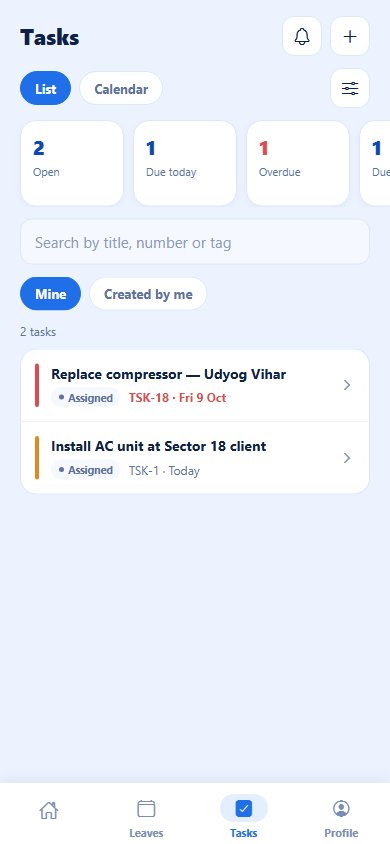
My tasksOpen, due today and overdue at a glance
GeoWave phone app: Work a task
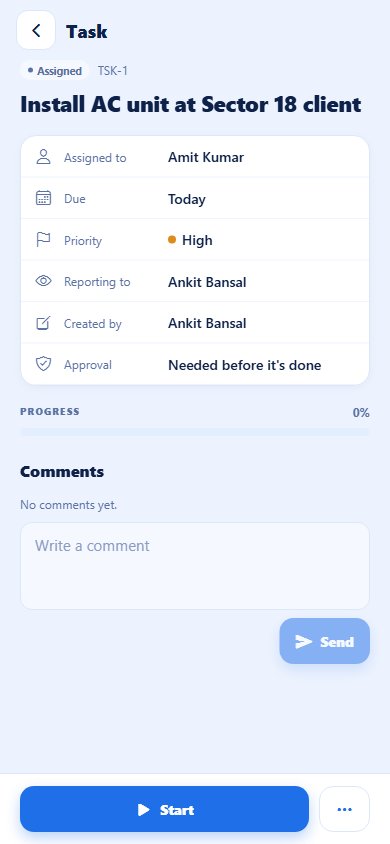
Work a taskStart, comment, track progress and send for approval
≤ 0 secClock-in, end to end
0 minBackground location updates
0 ptsOffline buffer per phone
0 ₹Hardware required
Get started

Live in three steps.

Sign up yourself — most teams are tracking by the next morning.

01

Create your organization

Sign up with your mobile number and email. Verify the number on WhatsApp and you're in — about two minutes, no card.

02

Add your people

Add employees with their mobile numbers, set shifts and draw geofences around your offices and sites.

03

Phones check in

Employees install the GeoWave app on Android or iPhone, sign in with their mobile number and check in. Watch the map light up.

Tasks

Know they're there.
Know the work got done.

GeoWave includes task management for the same team — so the visit, the check-in and the job it was for live in one place.

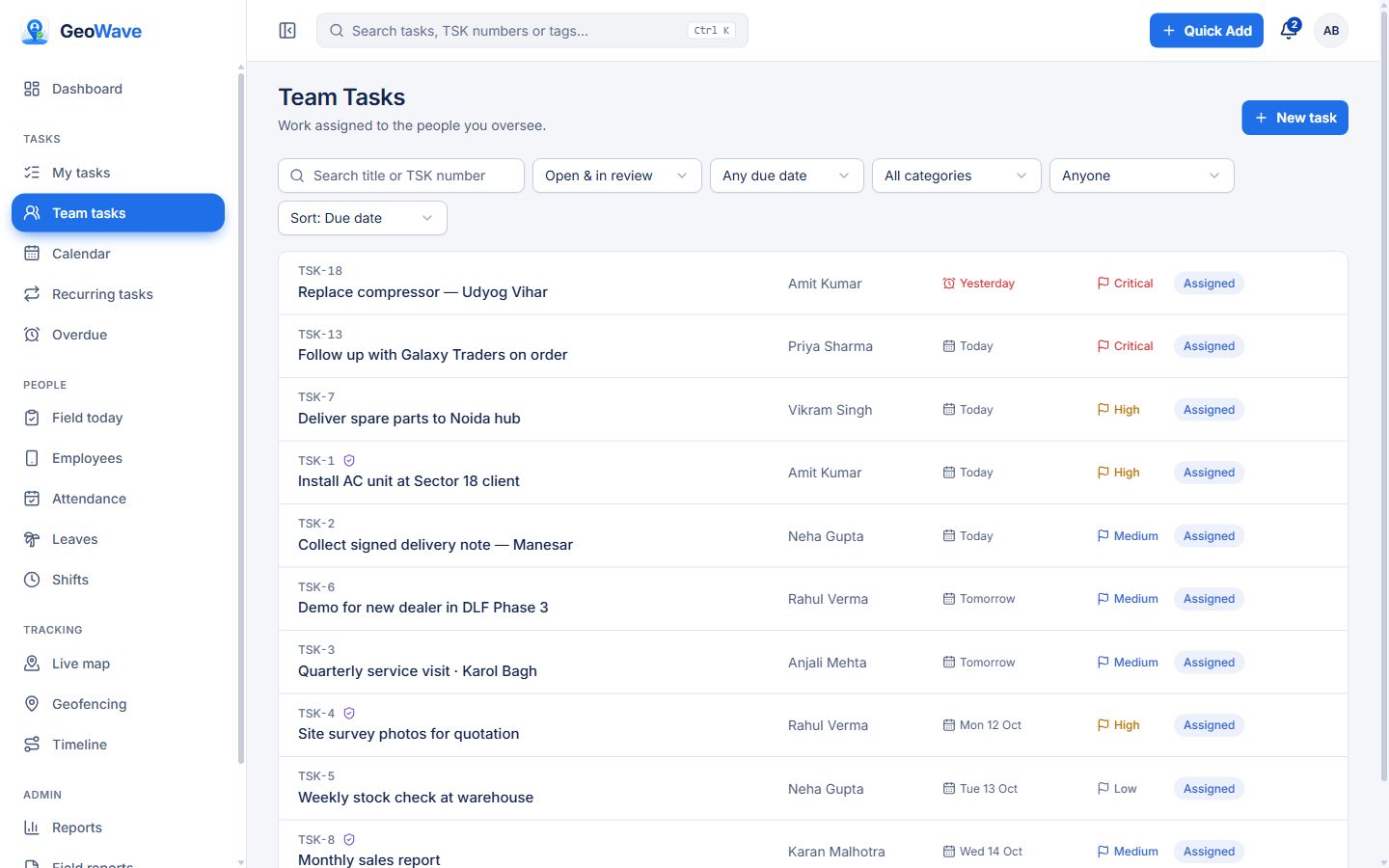
Assign, track, finishNumbered tasks with priority, due date, estimate, tags and progress. My tasks, team tasks, overdue and a calendar you can drag to reschedule.
Work together on itComments with @mentions, file attachments, and tasks that wait for other tasks — from the web or the phone.
Nothing slipsDue-soon and overdue reminders, approvals before a task is closed, and a reason when a task is transferred or its due date moves.
Recurring work & reportsDaily, weekly, monthly or yearly tasks that create themselves. Workload, overdue, completion trend and department reports.
app.geowave.co.in/team-tasks
GeoWave web dashboard: Team tasks
Pricing

Simple plans, priced for Indian teams.

Free for up to 5 people, with live tracking included. Simple per-user pricing when you grow — no per-ping charges, no hardware cost.

Free

Free forever
₹0
No card required
Start free

Up to 5 people · free forever

  • Selfie & GPS check-in, leave, shifts
  • Live team map & all-day tracking
  • 3 days of location history
  • 1 geofence
  • Tasks, including recurring tasks
  • Phone app, plus web dashboard for admins & managers

Business

Most popular
₹299 /user/month
+ GST as applicable
Buy now →

No limit on people

  • Everything in Free
  • Tasks that need approval before they close
  • 30 days of location history
  • 10 geofences
  • Desktop web app for every employee
  • Advanced reports
  • Priority WhatsApp support

Enterprise

Custom
Priced for your team
Talk to us

No limit on people

  • Everything in Business
  • Location history & geofences without limits
  • Desktop web app for every employee
  • Phone health & remote wake
  • Your own branding & API access
  • 50 GB storage · dedicated support

FREE FOR UP TO 5 PEOPLE, FOREVER · NO CARD REQUIRED · FACE CHECK ON REQUEST

Every plan includes

  • Android and iPhone app
  • Selfie & GPS check-in and check-out
  • Live team map with battery level
  • Background tracking every 3 minutes
  • Works offline, syncs on reconnect
  • Shifts, breaks & late marking
  • Leave requests & approvals
  • Tasks with comments & files
  • Sign in with email or mobile number
  • Push notifications
  • Cloud hosting in India with backups
  • Location notice & consent records

Need more than one company, an integration or on-premise hosting? Talk to us.

Questions

Asked by every owner we talk to.

What is GeoWave?
GeoWave is a field attendance and live-tracking app for teams in India, made by Aptivix Technologies in Gurugram. Employees check in with a selfie and GPS from their own Android phone or iPhone, and managers see a live team map, geofences, leave, shifts, tasks and attendance reports. It is not LocationTech GeoWave, the open-source geospatial library hosted by the Eclipse Foundation; that is an unrelated project with the same name.
How much does GeoWave cost?
Free for up to 5 people, with no card and no end date. Business is ₹299 per user per month plus GST, or 15% less billed yearly (₹3,049 per user per year), with no limit on people. Enterprise is priced for your team: talk to us.
Will it drain my employees' phone batteries?
No. GeoWave records a location every 3 minutes, and only while the employee is checked in. It's tuned specifically for the aggressive battery savers on Xiaomi, Vivo and other Indian Android phones, and our onboarding includes setting each device up correctly.
What happens in areas with no network?
Location points are stored safely on the phone — up to a full day's worth — and uploaded automatically the moment the connection returns. You never lose the trail.
Is this fair to employees? When does tracking stop?
GeoWave tracks only between check-in and check-out — the working shift they're being paid for. Off shift, tracking is off. Before their first check-in the app explains exactly what is recorded and who can see it, and records that they read it; while tracking is on, a notification on the phone says so. Face check is used only with the employee's consent, which they can withdraw at any time. Read our Privacy Policy.
Do we need biometric machines or any hardware?
None. The employee's own Android phone or iPhone is the attendance device — selfie plus GPS is stronger proof than a thumb machine at one gate, because it works at every client site.
How long does setup take?
One afternoon for a typical team. Sign up yourself — verify your mobile number on WhatsApp and you're in — then a short set-up guide walks you through departments, teams and inviting your people. Or we do it for you and help each phone get configured. Most teams are fully live the next morning.
Can employees sign in with their mobile number?
Yes. Everyone can sign in with their email or their mobile number, and reset a forgotten password with a code sent by email or WhatsApp.
Is the Free plan really free?
Yes, for up to 5 people, with no time limit. It includes check-in, live tracking with 3 days of location history, one geofence, leave, shifts and tasks. It stays free until you choose to upgrade.
Contact

Talk to a real person.

Questions, a demo, or help setting up your team — call, WhatsApp or write to us.

Stop asking "kahan ho?"
Start knowing.

Free for up to 5 people — no card, no end date. Bigger team? Upgrade from the app whenever you need to. Prefer a walkthrough? We'll set everything up with you.

Start free →Book a demoGet it on Google Play